
10.00 €
Office Preview for Attachments
Open Word, Excel, PowerPoint and Outlook attachments in the chatter, without downloading them and without any external service.
Get it on Odoo Apps
Documents
Preview Excel and CSV files in Documents before importing them, with Odoo Spreadsheet one click away.
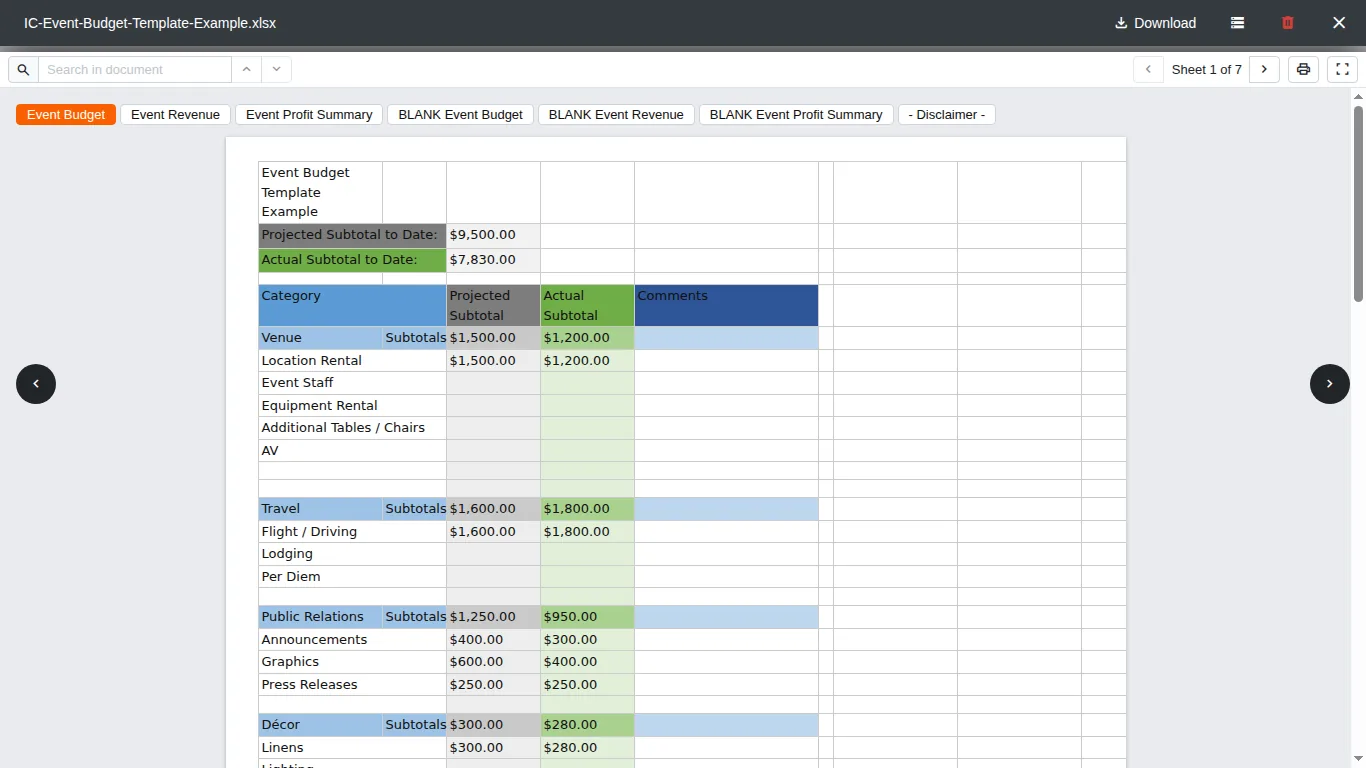
With Odoo Spreadsheet installed, clicking an Excel or CSV file in Documents opens the import dialog straight away. This companion shows the file first, sheet by sheet, so you can check it before turning it into an Odoo spreadsheet. The Open with Odoo Spreadsheet button stays in the toolbar, one click away, and nothing changes for the files Odoo Spreadsheet already owns.
It needs Office Preview for the Documents App and the Spreadsheet features of Odoo Documents, and installs itself as soon as they are present.
Documentation and installation are on the page of your Odoo version.
Word, Excel and Outlook attachments open instantly in the Odoo chatter, like PDFs. No downloads, and nothing leaves your server.
Read the article
Open Word, Excel, PowerPoint and Outlook attachments in the chatter, without downloading them and without any external service.
Get it on Odoo Apps
Search the chatter as you type, filter notes, emails and logs, reply in threads, get reminded and hide the chatter in one click.
Get it on Odoo Apps
The same office preview in the kanban, list and activity views of Documents, with readable thumbnails.
Get it on Odoo Apps